Service Scheduling
GitHub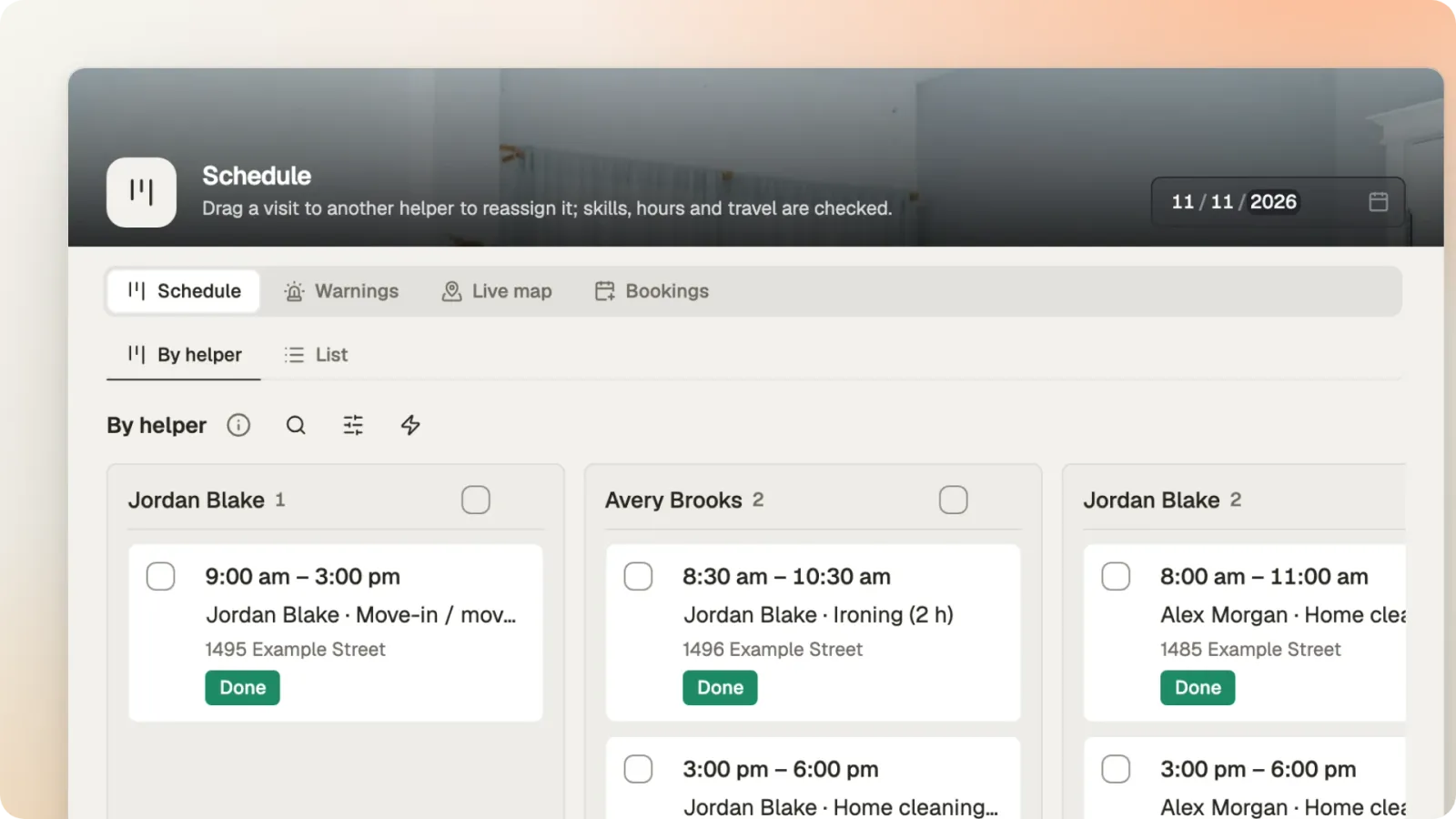
Service Scheduling is an end-to-end booking, staffing, and route-aware dispatch workspace for appointment-based field and local service teams — including HVAC, plumbing, electrical, cleaning, detailing, equipment maintenance, tutoring, and other scheduled on-site services. Customers book one-off or recurring appointments online or through the operations desk, qualified service providers are matched automatically around skills, working hours, time off, and real travel time, and dispatch tracks every job from pre-shift confirmation through live arrival and completion.
It replaces scattered booking spreadsheets, manual calendar juggling, group-chat check-ins, and reactive last-minute scrambling with a single operational workspace. Every booking, reassignment, route adjustment, arrival alert, and customer notification stays synchronized in real time across the desk, field staff, and customer portal.
Expected Business Impact
- Eliminate double-booking and manual dispatch guesswork: Every new booking, recurring series, and drag-and-drop reassignment automatically validates provider status, required skills, working days and hours, approved time off, and point-to-point driving plus turnaround buffers.
- Capture bookings 24/7 with fewer phone handoffs: An embeddable, phone-verified online portal lets customers browse services, see destination-aware open times, select recurring frequencies or preferred providers, and receive immediate confirmation — or automatic handoff to the desk if a slot fills mid-checkout.
- Reduce windshield time and balance staff workload: Matching scores candidates by minimal added route detour and balanced weekly hours while preserving scarce specialist skills, and background optimization continuously rebalances flexible future appointments to keep daily routes tight.
- Prevent missed appointments and surprise delays: Automated pre-shift check-ins confirm attendance ahead of each provider's first stop, while live GPS arrival monitoring flags late or silent providers early so dispatch can approve a ranked replacement in one click.
- Preserve a complete customer and service audit trail: Booking confirmations, reassignments, reschedules, cancellations, WhatsApp dispatch status, email delivery/open/reply trails, and field completion notes remain attached to every customer and appointment record.
Roles & Access
| Role | Primary Apps | What They Can See & Do | Governance & Isolation Boundaries |
|---|---|---|---|
| Operations | Scheduling, Configuration, My Day | Configure services, scheduling rules, and external connections; manage customer and provider directories, time off, and staff deactivation; create, reschedule, reassign, or cancel bookings; resolve dispatch alerts and approve replacement proposals; monitor the live GPS map. | Full operational authority across all records and desk workflows; routine reschedules inside the free-change cutoff are blocked unless an appointment is in recovery. |
| Providers | My Day | View their own daily chronological route, confirm or decline shifts, share live GPS position while on duty, open turn-by-turn directions, call assigned customers, start appointments, and submit completion notes. | Strictly isolated to their own profile, time-off records, and assigned appointments; can only progress their own stops from Scheduled to In Progress to Completed and cannot view other providers' schedules or update another person's GPS position or shift. |
| Verified Customers | Booking Portal | Sign in via mobile phone verification to request live destination-aware availability quotes, submit one-off or recurring bookings, export calendar invites, view upcoming and completed appointments with live arrival estimates, and read their message history. | Strictly scoped to records matching their verified mobile number; cannot view other customers' bookings, inspect provider calendars, or invoke internal dispatch actions. |
| Public Visitors | Booking Portal | Browse active services, pricing, durations, and anonymized open-slot summaries before signing in. | Read-only access to active service listings and anonymous slot counts; no customer details or individual provider schedules are exposed. |
Apps & Functionality
Scheduling
Operational command center for dispatchers, coordinators, and service managers.
| Module | Functionality |
|---|---|
| Schedule | Switch between a By Provider drag-and-drop board (including an Unassigned lane) and a sortable List view for any selected day. Reassigning cards across provider lanes validates skills, hours, time off, and travel buffers immediately; cards surface status, shift-check, attention, and live arrival badges, with quick actions to recommend replacements or cancel appointments. |
| Bookings | Manage All Bookings (one-off and recurring series with linked appointments and ranked preferred providers) and Portal Requests (pre-filtered to requests requiring follow-up when an online slot filled before confirmation). Creating a desk booking opens an interactive composer with live slot availability across the full recurring horizon, optional preferred providers (up to five in priority order), and atomic booking confirmation. |
| Dispatch | Centralized exception desk split into Needs Attention (unassigned stops, late-arrival risks, inactive-provider appointments, and replacement proposals awaiting approval, complete with live countdown timers and one-click Recommend, Approve, and Cancel actions) and Shift Checks (monitoring asked, declined, and unanswered pre-shift confirmations). |
| Live Map | Split-screen live operations view pairing all In Progress and starting-within-four-hours appointments alongside an interactive map showing active provider GPS positions and directional route overlays to each provider's current or next stop. |
| Customers | Searchable customer directory storing unique mobile numbers, email addresses, default service addresses, map pins, and notes. Each customer hub organizes Upcoming appointments, a Past Appointments timeline (with completion notes and late-cancellation flags), Bookings (with inline new-booking creation), and Notices with full delivery logs. |
| Providers | Roster of field staff detailing normalized skill tags, working weekdays and daily hours, linked user accounts, base coordinates, live GPS timestamps, Appointments, and non-overlapping Time Off records. Includes one-click Deactivate, which retires a provider after their last working day and proposes closest-skill replacements for later scheduled jobs. |
| Appointment Recovery | Embedded recovery tab inside any scheduled appointment record. Displays a live start countdown, ranked replacement candidates (with added drive minutes and scheduled weekly hours), one-click assignment, recommendation refresh, a 14-day Choose Another Time picker, and an action to mark the assigned provider unavailable. |
Configuration
Administrative setup for tailoring the workspace to any local or field service business without code changes.
| Module | Functionality |
|---|---|
| Services | Maintain the bookable service catalog — service name, optional category, required skill tag, duration (15 minutes to 12 hours), price, customer-facing description, and active status. |
| Scheduling Rules | Tune workspace-wide operating parameters from one screen: slot start interval, travel turnaround buffer, portal booking horizon, customer free-change cutoff window, live arrival alert threshold and monitoring lead time, and pre-shift confirmation lead time and reply window. |
| Connections | Connect and manage shared workspace accounts for WhatsApp, Email, and Google Routes, keeping credentials sealed from end users. |
My Day
Mobile-friendly daily workspace built for field providers on the move.
| Module | Functionality |
|---|---|
| Today | Shows the provider's chronological route for today (or any selected date) with estimated inter-stop driving times and spare buffers, pre-shift confirmation or unavailability reporting, continuous background GPS sharing while on duty, one-tap Google Maps directions (per stop or multi-stop route), click-to-call customer links, and Start Appointment / Complete Appointment controls with completion notes and automatic timestamps. |
Booking Portal
Standalone, website-embeddable customer self-service experience.
| Module | Functionality |
|---|---|
| Book Online | Three-step booking journey: browse active services and open-slot summaries, verify mobile number, choose service details, frequency (one-off, weekly, fortnightly, or monthly), pinned service address, optional preferred provider, and special instructions, pick from live destination-checked slots grouped by morning, afternoon, and evening, and receive instant confirmation with a downloadable calendar file — or automatic desk follow-up if the slot filled moments earlier. |
| My Appointments | Phone-verified customer dashboard displaying upcoming appointments (with assigned provider name and live arrival countdown when on the way), recent completed visits, and received notification history. |
Automations & Connections
Built-In Automations
- Public Slot Publishing: Refreshes anonymous open start times across the configured booking horizon every 15 minutes — and automatically whenever services, providers, time off, bookings, appointments, or rules change.
- Destination-Aware Quotes & Portal Intake: Computes address- and recurrence-specific availability quotes on demand (valid for 15 minutes), automatically matches or creates customer profiles with geocoded addresses, confirms bookings atomically when coverage exists, and routes contention cases to operations for follow-up while notifying both customer and team.
- Travel-Time Caching & Route Rebalancing: Refreshes road travel lookups every 15 minutes (and after booking or location updates), automatically reassigns stops that become unreachable under updated travel times, and continuously rebalances flexible future bookings beyond the free-change window to reduce total fleet driving and equalize weekly utilization.
- Pre-Shift Check-Ins & Recovery Proposals: Prompts each provider ahead of their first daily appointment every 10 minutes via in-app notification and WhatsApp; if a provider declines or does not reply before the cutoff, automatically logs an unavailability day off and prepares ranked replacement recommendations for operations approval.
- Live GPS Arrival Monitoring: Checks active upcoming appointments every 5 minutes inside the arrival-monitoring lead window, flagging missing or stale GPS fixes (older than 15 minutes) or traffic-aware arrival times exceeding the alert threshold and notifying operations.
- Multi-Channel Notifications: Dispatches customer confirmations, provider changes, reschedules, cancellations, and provider assignment alerts over WhatsApp and email, recording WhatsApp queue status alongside email sent, delivered, opened, bounced, and customer reply events.
External Connections
- WhatsApp: Sends outbound customer notices, provider assignment alerts, and pre-shift confirmation reminders through a shared workspace WhatsApp account.
- Email: Delivers customer notice copies whenever a customer has an email address on file and synchronizes mailbox delivery, open, bounce, failure, and reply events back onto each notice.
- Google Routes (Optional): Supplies cached point-to-point road driving times for matching and live traffic-aware arrival estimates; if disconnected, scheduling automatically falls back to straight-line distance estimates with zero disruption.
- Address Geocoding: Built-in address search resolves pinned locations in the portal and automatically geocodes new customer addresses during portal intake.
Scope & Boundaries
- Included out of the box: Runtime service catalog, configurable scheduling and alert thresholds, customer self-service booking portal, customer and provider directories, skill- and travel-aware matching, recurring series booking, automated route rebalancing, pre-shift confirmations, live GPS arrival tracking, exception recovery, and WhatsApp/email customer and provider notices.
- Billing, payments, and invoicing: Services store a reference price for display in the catalog and portal, but online payment collection, charging late-cancellation fees, invoicing, and accounting ledger posting are handled by external billing or finance systems.
- Payroll, HR, and labor compliance: The workspace tracks working hours, job timestamps, and time-off dates solely for scheduling eligibility; payroll calculation, overtime rules, and statutory employment records remain outside this workspace.
- Inventory, parts, and job costing: Stock control, parts consumption, supplier purchasing, and job-level margin accounting are outside the scope of this template.
- Customer self-service modifications: Verified customers can submit new bookings and view appointment status in the portal, while cancellations and reschedules are executed through operations so change-cutoff and recovery policies are enforced consistently.
- Third-party accounts and device permissions: Organizations connect and manage their own WhatsApp, Email, and Google Routes accounts; live GPS tracking requires field providers to allow location sharing on their devices while using My Day.