Fleet Management
GitHub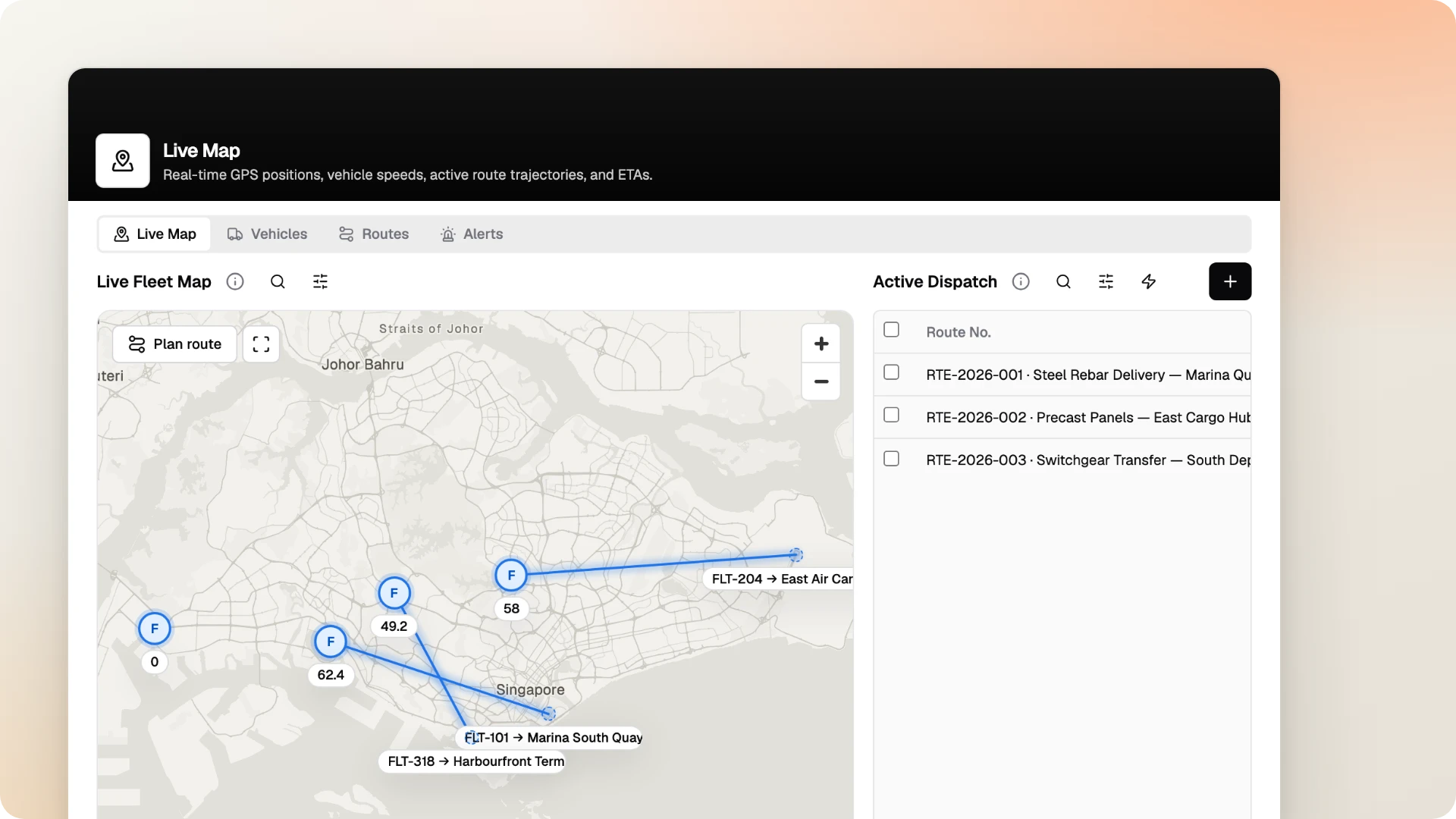
Fleet Management is an end-to-end operational workspace for real-time GPS vehicle tracking, daily trip scheduling and dispatch, geofence and speed governance, live ETA monitoring, and exception management. It brings live vehicle locations, active route trajectories, and operational alerts onto a single dispatch screen while keeping telematics gateways, geofence rules, and driver master records isolated in a dedicated configuration workspace.
Built to replace scattered GPS vendor portals, daily dispatch spreadsheets, ad-hoc phone check-ins for arrival times, and manual incident logs, the workspace gives dispatch teams one live operational picture and gives fleet administrators clear control over safety rules, connectivity, and audit history.
Expected Business Impact
- Unified real-time visibility: Pair live GPS positions, speeds, destinations, and active route trajectories side by side with open exceptions so dispatchers respond immediately without switching between separate tracking portals and spreadsheets.
- Faster daily dispatch and reliable ETAs: Schedule and track daily trips from a dedicated day-by-day board that automatically syncs vehicle destinations on dispatch, reassignment, or completion, and proactively flags routes projected to arrive 15 minutes or more behind schedule.
- Proactive safety and boundary governance: Detect vehicle or zone-specific overspeeding, restricted-area entry, depot departures, and silent transponders (offline for more than 30 minutes) automatically, routing every exception through structured triage and resolution.
- Protected configuration and clean separation of duties: Keep GPS gateway credentials, geofence boundaries, zone speed limits, and driver license records restricted to Fleet Administrators so routine dispatch work never alters telematics or compliance settings.
- Tamper-resistant audit trail: Preserve an append-only GPS location history, automatically lock completed or cancelled routes against retroactive edits, and timestamp resolved alerts so safety reviews and service inquiries rest on reliable records.
Roles & Access
Three workspace teams separate daily dispatch operations from system configuration and read-only oversight:
| Role | Workspace Access | Key Responsibilities & Boundaries |
|---|---|---|
| Fleet Administrators | Fleet Operations + Configuration | Full operational and administrative authority. Connect external GPS transponder gateways and Google Routes, define geofence boundaries and zone speed limits, maintain driver profiles and license records, and oversee all vehicles, routes, and alerts. |
| Fleet Dispatchers | Fleet Operations | Manage vehicles, plan and dispatch daily routes, import historical GPS log spreadsheets, refresh live ETAs, run transponder syncs and health checks, and acknowledge or resolve alerts. Can view drivers and geofences for reference but cannot modify connections, geofence rules, or driver records. |
| Fleet Viewers | Fleet Operations (Read-Only) | Monitor the live fleet map, vehicle statuses, GPS telemetry history, daily dispatch schedules, and operational alerts without permission to edit records, dispatch trips, or trigger operational actions. |
Key governance safeguards apply across all roles:
- Isolated configuration: Telematics gateway credentials, geofence definitions, and driver directory records live strictly inside the Configuration app and cannot be changed by dispatchers or viewers.
- Immutable operational history: Recorded GPS telemetry entries are append-only and cannot be edited or deleted once committed. Completed or cancelled routes lock core dispatch details while still allowing follow-up cargo notes. Resolved alerts automatically record their resolution timestamp and lock classification details while still allowing resolution notes.
Apps & Functionality
The workspace is organized into two purpose-built apps — Fleet Operations for day-to-day visibility and dispatch, and Configuration for administrative setup — supported by a built-in Fleet Operations Assistant for querying fleet status, investigating alerts, and coordinating routine checks.
Fleet Operations
| Page / Module | Functionality |
|---|---|
| Live Map | Split-screen operational dashboard combining an interactive fleet map — showing live vehicle pins with hover summaries, speed badges, status indicators, and active route destination trajectories — with a Live Alerts panel for open and acknowledged exceptions. Includes one-click toolbar actions to refresh live ETAs and run a transponder health check. |
| Vehicles | Central register of transponder-equipped fleet assets (vans, lorries, tippers, crane trucks, trailers, pickups, tankers, and cars) displaying plate number, transponder ID, assigned driver, status, live speed against speed limit, current destination, fuel level, and last reported time. Opening any vehicle opens a five-tab Vehicle Hub (Record, Live Position, Telemetry Stream, Routes, and Alerts) with quick creation panels to dispatch a new route or log an alert directly for that vehicle. |
| Dispatch & Routes | Dual-view trip workspace combining a Day-to-Day Schedule (date navigation, scheduled-day chips with trip counts, daily KPI summaries for total/active/planned/completed trips and planned distance, and trip cards) with an All Routes register. Supports ordered intermediate waypoints (with planned ETA, actual arrival time, and pending/arrived/skipped status), automatic road-adjusted distance and ETA calculations, lifecycle tracking from Planned through Dispatched, En Route, Arrived, and Completed or Cancelled, and automatic synchronization of the assigned vehicle's destination and availability. |
| Alerts | Numbered exception ledger covering five operational alert types — Overspeed, Geofence Enter, Geofence Exit, Offline, and Route Delay — categorized by severity (Info, Warning, Critical). Supports structured triage from Open to Acknowledged to Resolved with recorded location, measured speed versus applicable limit, automatic resolution timestamp, and audit notes. |
Configuration
| Page / Module | Functionality |
|---|---|
| Connections | Administrative console for connecting external telematics and routing services. Configure workspace-level GPS Transponder Gateway accounts (gateway credentials, positions feed path, and signed real-time push-notification URL) and an optional Google Routes connection for live traffic-aware ETA calculations. |
| Geofences | Split-screen zone register and interactive map for defining circular GPS boundaries across five zone types — Depot, Job Site, Customer, Corridor, and Restricted. Configure center coordinates, radius, optional zone speed-limit overrides (which automatically apply whenever stricter than a vehicle's standard limit), and enter/exit alert triggers. |
| Drivers | Master directory of commercial fleet drivers recording driver code, full name, license number, license class (Class 3, Class 4, Class 5, Hazmat, Crane), license expiry date, phone, email, and availability status (Active, On Leave, Suspended, Inactive). |
Automations & Connections
- GPS Transponder Gateway (Live Feed & Scheduled Sync): Connects to external telematics platforms (such as Teltonika, Geotab, Samsara, Traccar, Wialon, or a custom gateway). Signed push notifications wake synchronization immediately when new positions arrive, backed by a 5-minute scheduled check that advances strictly by the latest received timestamp without duplicating pings.
- Bulk GPS Log Upload: Dispatchers can upload historical GPS logs in CSV or Excel format. Rows are matched automatically to vehicles by transponder ID or plate number, with upfront validation of coordinates, speed, odometer, and fuel ranges before anything is imported.
- Automatic Telemetry Processing & Alerting: Every committed batch of GPS updates automatically refreshes each vehicle's live position, speed, heading, ignition state, fuel level, monotonically increasing odometer, and operational status (En Route, Idle, or Stopped, without overriding Maintenance), updates active route peak speed and ETA, and raises overspeed alerts (Warning when over limit; Critical at 15 km/h or more over) as well as geofence entry/exit alerts.
- Live Route ETA Refresh & Delay Detection (Optional Google Routes): Dispatchers can refresh live ETAs across all dispatched and en-route trips at any time. When Google Routes is connected, the workspace fetches live traffic-aware drive times and automatically falls back to GPS-based speed estimates if unavailable. Trips projected to arrive 15 minutes or more past planned arrival automatically open deduplicated Route Delay alerts (Warning at 15+ minutes; Critical at 45+ minutes).
- Scheduled Fleet Health Monitoring: Runs automatically every 15 minutes (and on demand from the Live Map) to detect active or idling vehicles that have not sent a GPS update for more than 30 minutes. Stale vehicles are marked Offline, deduplicated Offline alerts are opened (Warning at 30+ minutes; Critical at 90+ minutes), and Fleet Dispatchers and Fleet Administrators receive notifications.
Scope & Boundaries
Included out of the box:
- Real-time GPS position tracking, append-only telemetry logging, and bulk CSV/Excel telemetry import.
- Daily dispatch scheduling, route lifecycle tracking, ordered intermediate waypoints, and automatic vehicle destination synchronization.
- Circular geofence monitoring, zone speed-limit enforcement, live ETA updates (with optional Google Routes traffic), and automated safety/offline/delay alerting.
- Driver profile and license registry, role-based access control, bilingual English and Simplified Chinese interface, and isolated administrative configuration.
Outside the workspace boundary:
- GPS hardware, cellular SIMs, and telematics hosting: Physical in-vehicle transponders, data plans, and upstream telematics gateway servers are procured and operated outside this workspace.
- In-cab turn-by-turn navigation and driver mobile apps: Routes and waypoints are planned and monitored centrally by dispatchers; drivers rely on separate in-cab navigation tools for turn-by-turn guidance.
- Automated vehicle routing optimization: Dispatchers assign vehicles, drivers, and stop order directly; algorithmic multi-vehicle route optimization is not included.
- Workshop maintenance, fuel billing, and financial accounting: Vehicles can be marked in Maintenance and live odometer/fuel snapshots are recorded, but preventive service schedules, repair work orders, fuel card reconciliation, driver payroll, and general-ledger accounting belong in dedicated maintenance or finance systems.
- Statutory transport authority filings: Recorded telemetry and alerts support internal safety and service oversight, while statutory hours-of-service, tachograph, or regulatory submissions remain the fleet operator's responsibility.
Documentation
- Technical Documentation & Developer Quickstart — Local setup, validation commands, migration workflow, and documentation map.
- Architecture & Inner Mechanisms — Detailed system topology, data model ER diagram, state machines, telemetry propagation pipeline, geospatial formulas, automations, and access control matrix.
- Source Reference — Exact file-by-file inventory of models, syncs, integrations, apps, automations, custom fields, and policies.